RCS Cookies Integration
Overview
In ADA’s Digital Experience Personalization system, the RCS (RichRelevance Client Session) parameter is used to maintain session continuity, track anonymous user behavior, and manage Multi-Variate Testing (MVT) assignments, ensuring a seamless personalization experience across sessions and devices.
The parameter is delivered as a compact, encoded string, an Avro-serialized map of session fields, compressed using zlib DEFLATE and then Base64-URL encoded. This format allows multiple pieces of session data to be packed into a single alphanumeric value that is safe to transmit and store as a cookie.
The RCS parameter is set and read as a first-party cookie, i.e., a cookie served directly from the client's own domain rather than a third-party domain. As a result, it is not subject to third-party cookie restrictions and can persist reliably within the client's site context.
Definitions
-
rcs: A compressed and encoded container (typically ~114 characters) returned in API responses and persisted client-side as the rr_rcs cookie, which is set as a first-party cookie on the client's own domain. It is produced by encoding a map of session fields using Avro's binary map format, compressing the payload with zlib DEFLATE to minimize its size, and Base64-URL encoding the result. It stores various session-related information, including the provisional user ID (rrGuid) and the active MVT treatment assignment (mvtid). The rcs value is alphanumeric, case-sensitive, and dynamically updated based on user actions.
Note: Do not restrict the length of the rcs/rr_rcs value, as the DXP platform depends on this parameter to capture the shopper's usage and behavioral data.
-
rrGuid: A provisional user ID contained within the rcs parameter (internal field key uc). It is a persistently generated GUID used internally by the ADA platform to recognize anonymous, non-logged-in users and personalize their experience across sessions and devices. Its value also contains a creation timestamp, which the platform can use to determine how long the identifier has been active. Because the containing rr_rcs cookie is first-party, this recognition works reliably within the client's own site without depending on third-party cookie support.
Note: By default, rrGuid visibility is disabled. Contact your ADA consultant to enable it through Site Configuration.
-
mvtid: The Multi-Variate Testing treatment identifier contained within the rcs parameter (internal field key mvtid). It records which variant of an active multivariate test the current session has been assigned to. This helps keep the visitor's experience consistent for the duration of the test and allows their behavior to be attributed to the correct treatment group.
Server-Side Integration: Cookie Proxy
In server-side implementations, merchants act as a cookie proxy (or cookie pass-through), enabling the ADA Digital Experience Personalization server to indirectly access browser cookies. This ensures seamless personalization and session continuity, even when the ADA server cannot directly access the user's browser cookies.
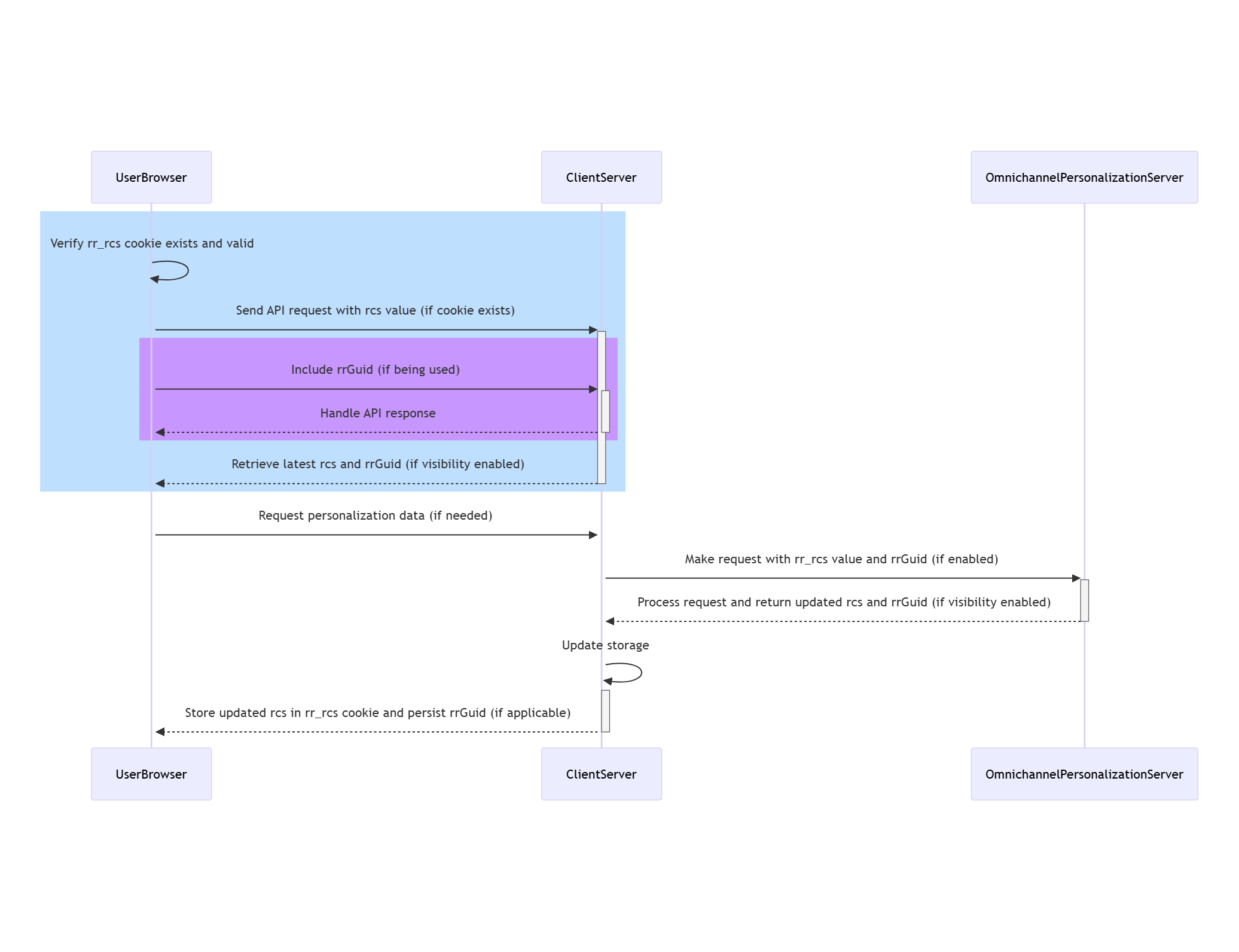
How the Cookie Proxy Works
-
Step 1: Browser Request
-
The User’s browser requests a page from the client's website. The request includes stored rr_rcs cookie. Clients may choose to use only rcs; rrGuid is optional.
-
-
Step 2: Client Server Receives the Request
-
The client server reads and stores the rr_rcs cookie (and rrGuid if available) from the browser request.
-
-
Step 3: Client Server Requests Personalization Data
-
If personalization data is needed, the client server makes a server-side API request to ADA, passing:
-
The stored rr_rcs value from the browser cookie.
-
The rrGuid (if available and enabled).
-
-
-
Step 4: Digital Experience Personalization Server Responds
-
The Digital Experience Personalization server processes the request and returns an API response.
-
The API response includes:
-
An updated rcs value (if changed).
-
The rrGuid value (if visibility is enabled).
-
-
-
Step 5: Client Server Stores the Updated Values
-
The client server updates and stores the new rr_rcs cookie under the client’s domain.
-
Optionally retains the rrGuid for future API calls.
-
RCS Usage Flow
-
Check for Existing Cookie: Verify if the rr_rcs cookie exists and contains a valid value.
-
Send API Request:
-
If the cookie exists, include the rcs value in the request.
-
If rrGuid is being used (optional), include that as well.
-
-
Handle API Response:
-
Retrieve the latest rcs from the response.
-
Retrieve rrGuid (if visibility is enabled).
-
-
Update Storage:
-
Store the updated rcs in the rr_rcs cookie.
-
Optionally persist rrGuid for future personalization tracking.
-
rrGuid Usage and Visibility
-
The rrGuid is returned in the API response at the same level as rcs, only if rrGuid visibility is enabled for the site.
-
Customers can choose to:
-
Use only rcs as a passthrough cookie for session continuity.
-
Or use both rcs and rrGuid to gain insight into the provisional user ID.
-
-
If the rrGuid is passed in an API request along with rcs, the ADA platform resets the rcs value to embed the provided rrGuid. Other components of the rcs value are preserved.
RCS Storage and Retrieval
-
Web (Desktop and Mobile): Stored as a first-party browser cookie named rr_rcs.
-
Apps: Stored in local storage (cookies are not available in app environments).
-
The rr_rcs cookie has a default expiry duration of 364 days.
-
Always retrieve and pass the rcs value (and optionally rrGuid) in subsequent API calls. Update and store with each new API response.
Behavioural Properties of RCS
-
It is dynamic and may or may not change with every interaction.
-
The rcs parameter supports tracking across multiple sessions.
-
If cookies are cleared, a new rcs and rrGuid will be generated, resetting prior tracking.
-
It is not a persistent identifier, but it allows maintaining session continuity as long as the cookie exists.
RCS Hygiene and Reset Rules
Rule of thumb: If there is any doubt about whether the visitor’s identity has changed, pass a blank rcs.
Managing rcs for Session Continuity:
|
Scenario |
Action |
|---|---|
|
Continue previous session |
Pass the last known rcs value exactly as received from the previous API response. Do not alter or modify the rcs value. |
| Start fresh anonymous session | Pass a blank rcs value. |
| User logs out on a public computer |
Clear the rcs value to avoid cross-user session persistence. |
| Fresh app installation |
Pass a blank rcs on first use. |
| Device with the same owner (app use) |
Retain the existing rcs unless reset is explicitly needed. |
Conclusion
The rcs and rrGuid parameters are vital for delivering personalized experiences across web and app environments. While rcs is mandatory for session continuity, rrGuid is an optional, client-visible identifier that helps in tracking provisional user IDs. Proper handling and passing of these values ensure accurate tracking and privacy compliance. Following these guidelines helps ensure effective and secure ADA personalization deployments.