Release Summary 26.06 | Mar 23, 2026
The following key features and improvements, along with bug fixes, have been released in Digital Experience Personalization (DXP) in the release version 26.06.
Find
Find API Enhancements with Non-Find Query Exclusion and Reporting Optimization
The Find API report now supports exclusion of star-based queries and facet-only requests, ensuring reporting reflects true Find usage and does not include discover-style calls executed through Find. A new checkbox labeled “Exclude star based queries and facet only queries” has been added to the reporting interface. By default, it remains unchecked to preserve current behavior. When selected, the report filters out requests using star-based queries or responseStyle=facetOnly, allowing users to compare total Find calls with filtered Find calls for clearer insight into actual API usage.
In addition, the Find API call count reporting logic has been reviewed and optimized to improve performance and stability in production rollup processes. Response style handling has been enhanced to ensure more efficient processing and accurate reporting.
Jira: ENG-31790, ENG-31791, ENG-31609
MVT Find Configuration Test: Exclude Non-Find Queries from Reporting
Find configuration test reporting in MVT now excludes non-Find queries to provide more accurate and reliable performance insights. This ensures reporting reflects only valid Find activity and avoids inflated metrics caused by discover-style or auxiliary calls.
The report filters out star-based queries, requests with responseStyle=facetOnly, and queries with findCallType=overlay. By default, Find reporting now reflects search page views with these queries excluded, ensuring only true Find calls are considered in MVT reporting and qualification scenarios.
Jira: ENG-31513
Social Proof
Social Proof Coverage Analysis Report
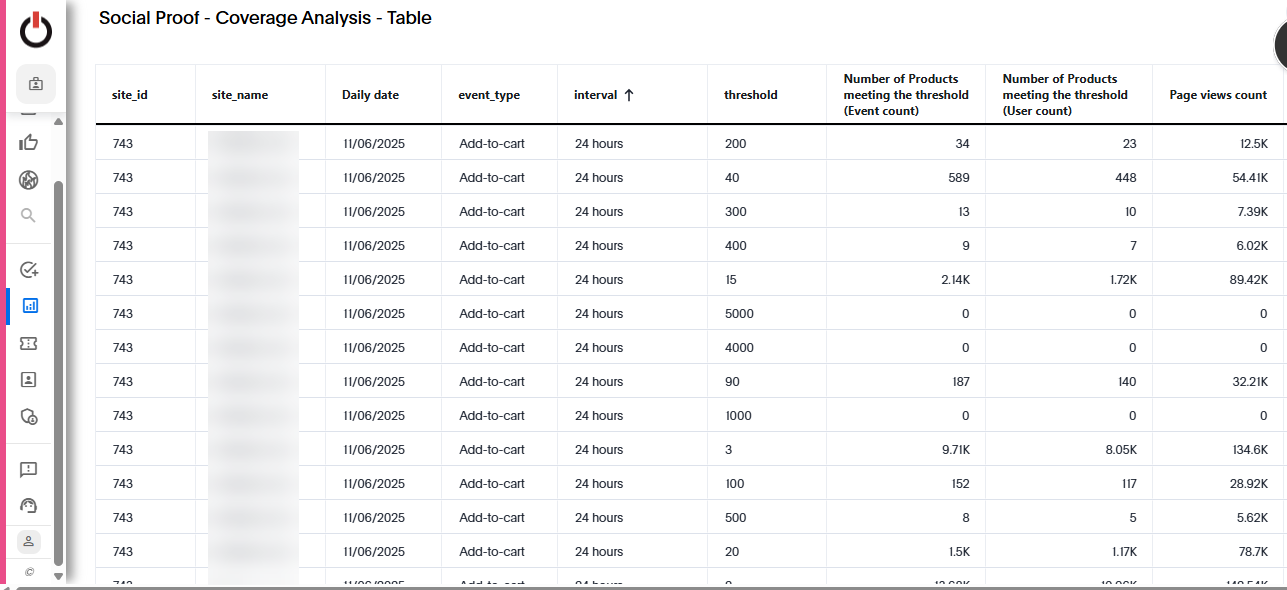
A new Social Proof Coverage Analysis report is now available, enabling users to evaluate how many products meet specific thresholds across different intervals and metrics. This helps Digital Optimization Managers identify appropriate thresholds and intervals based on actual product coverage.
The report is based on a single-day snapshot (default: Today - 1) and supports analysis by Event Type (Views, Add to Carts, Purchases), Interval or Threshold, and optional category selection. It includes both graph and table visualizations, showing product coverage using User Count (unique users), Event Count (total events), and associated item page views across supported intervals and thresholds.
Visualizations have also been added to enhance coverage analysis. These visualizations display product coverage trends by interval or threshold, with user count and event count on the primary axis and item page views on the secondary axis, providing clearer insight into product-level coverage patterns over time.
Social Proof Reports Added to Left Navigation
For clients enabled with Social Proof, the following reports are now available in the left-hand menu:
-
Social Proof Message Level Reporting (Item Page)
-
Social Proof Coverage Analysis Report
These reports appear alongside the Social Proof API Report and are listed in alphabetical order for easier navigation and access.
Jira: ENG-32128
Social Proof Messaging API Enhancement with Event Type
The Social Proof Messaging API has been enhanced to include the event type (Views, Add to Carts, or Purchases) in the API response. This ensures that the correct icon can be displayed for each optimized message based on its associated event type.
The update maintains backward compatibility and does not impact existing clients currently using the API.
Jira: ENG-31387
Ensemble AI
Ensemble AI Multi-Select Support for Product Attribute Filters
Ensemble AI now supports multi-select for product attribute filters, allowing users to choose multiple values for a single attribute when creating a style. This removes the need to create separate styles for different attribute values within the same theme.
For example, users can select multiple values under an attribute such as Collection, and the system will retrieve all products matching any of the selected values (OR logic). Across different attributes, filtering continues to follow AND logic. The API has also been updated to support passing multiple values per attribute, ensuring consistent behavior across style configuration and model processing.
Other Feature Enhancements
The following feature enhancements and upgrades have been made in the release version 26.06.
|
Jira # |
Module/Title |
Summary |
General Availability |
|---|---|---|---|
|
Enterprise Dashboard: New Dynamic Experience Template: Promo Header with Button |
A new template, Promo Header with Button, has been added to the New Dynamic Experience UI. This template enables users to quickly create promotional headers with a configurable call-to-action button, simplifying campaign setup and ensuring consistent design across promotional experiences. |
23-Mar-26 |
|
|
Enterprise Dashboard: client.js Update to Use showOnlyQualified Parameter |
The client.js implementation has been updated to use the showOnlyQualified parameter by default in the experiences API call. This change ensures that only experiences eligible for display are returned, eliminating the need for a separate targeting API request. With this update, the targeting call is no longer made, and all expected experiences continue to be correctly returned and displayed on the page. |
23-Mar-26 |
|
|
Platform: Smartphone Compatibility Enablement for Cases and Screen Protectors |
The compatibility pipeline has been enabled to support matching smartphones with compatible cases and screen protectors. This enhancement ensures that products from defined seed categories such as mobile phones are accurately linked with relevant accessory categories, including cases and screen protectors. The implementation supports catalog synchronization through the streaming catalog API, ensuring compatibility data remains current and aligned with ongoing catalog updates. |
23-Mar-26 |
|
|
Enterprise Dashboard: Strategy Rules Page Performance Improvement |
The Strategy Rules page has been optimized by updating the /strategies API call to request strategy messages only for the targeted page type(s). Previously, retrieving messages across all page types caused delays, especially for sites with a large number of Configurable Strategies. The pageTypeName parameter is now included in the API request, and can be passed multiple times to support multiple page types. This ensures the response returns only the relevant strategy messages, significantly improving page load performance. |
23-Mar-26 |
|
|
Engage: Personalize API Enhancement for Content + Recs Campaigns
|
The Personalize API response has been enhanced to include the strategy message and strategy name for content + recommendations campaigns. This allows shoppers to understand why specific recommendations are being shown within combined content experiences. For content + recs campaigns, the strategy message is now included within the creative object in the same format as the recsForPlacements response. Additionally, when includeStrategyData=true is passed in the request, the strategy name is also returned within the creative object, ensuring consistent structure across APIs. |
23-Mar-26 |
|
|
Enterprise Dashboard: Test Drives Enhancements to Rules Table and Preview URL |
The Rules table in the Recs Test Drive has been updated to display actively applied rules at the top, including merchandising rules that boosted or filtered products and any strategy rules used in the request. This makes it easier to identify which rules directly influenced the results. In both Recs and Content Test Drives, the cfrad parameter has been removed from the displayed preview URL. Additionally, when the View Recs or View Content button is clicked, the Products or Content tab is now automatically set as the active tab, ensuring users immediately see the latest results. |
23-Mar-26 |
|
|
Enterprise Dashboard: Improved Default Behavior on Vue Pages |
Default behaviors across Vue-based pages have been updated to improve usability and align with standard browser expectations. This applies to the New Configurable Strategies page, User Affinity Configuration, and the Placement Profile page. Users can now view the full URL on hover, open links in a new tab via right-click, and copy strategy names and links as rich text. These updates enhance navigation and make interaction more intuitive across all supported Vue pages. |
23-Mar-26 |
|
|
Platform: Synchronous Count API for Streaming Catalog
|
A new synchronous Count API has been added to the Streaming Catalog service to return the number of events received per hour or within a specified hourly range for a given site or API key. This complements the existing asynchronous Count API. The new endpoint follows the naming convention v2/count and has been implemented based on the provided documentation and HDL. |
23-Mar-26 |
|
|
Platform: Partition Cleanup for Streaming Ingest Counts Table |
Partition cleanup has been implemented for the Streaming Ingest Counts table to ensure efficient data management and prevent long-term storage buildup. |
23-Mar-26 |
|
|
Logging for Snapshot Cache Misses in Streaming Ingest |
Additional logging has been implemented to capture snapshot cache misses caused by HTTP failures during the streaming ingest process. This provides better visibility into ingest disruptions and helps with faster root cause analysis. |
23-Mar-26 |
|
|
Social Proof UI: Icon Support with Client-Side Optimization |
Social Proof now supports dynamic icon rendering when optimization is enabled through client-side integration. The Social Proof Messaging API provides the event type (Views, Add to Carts, or Purchases) for each message, allowing the user interface to display the appropriate icon automatically. The implementation supports multiple messages per event type. When icons are enabled, the event type is used to map and display the correct icon, ensuring consistent and accurate visual representation across optimized messages. |
23-Mar-26 |
Bug and Support Fixes
The following issues have been fixed in the release version 26.06.
|
Jira # |
Module/Title |
Summary |
General Availability |
|---|---|---|---|
|
Enterprise Dashboard: Streaming Engine Stability Improvement for Scoped Actions |
An issue was identified where the Streaming Engine could throw a NullPointerException when processing a propertyMatch scoped action defined only for products, followed by ingestion of a different item type such as categories. This caused the engine to fail and restart repeatedly. The behavior has been corrected to prevent runtime failures. Scoped actions that are not applicable now fail gracefully with proper error messaging in common status, and the engine no longer throws NPE or enters a restart loop. |
23-Mar-26 |
|
|
Enterprise Dashboard: Product Catalog Region Refresh Bug Fixes |
Two region-related issues on the Product Catalog page have been resolved for sites with regional product availability and regionalized primary categories. First, the Regional Pricing table no longer duplicates regions when a region is updated in the Attribute Settings section. Previously, each region change caused the original set of regions to be appended again in the table. Second, the primary category now correctly reflects the selected region. If a region does not have a defined primary category and no global primary category exists, the UI no longer displays a previously selected region’s primary category. Instead, the category is shown as a standard category, ensuring accurate regional behavior. |
23-Mar-26 |
|
|
Social Proof Optimization: Multiple Messages Returned When Disabled |
An issue was identified where multiple Social Proof messages were returned in the API response even when Enable Multiple Message was set to OFF. This caused more than one qualifying message to appear in the response despite the configuration restricting it to a single message. The behavior has been corrected to align with the configuration. When Enable Multiple Message is ON, one or more qualifying messages may be returned. When it is OFF, only a single qualifying message is returned in the API response. |
23-Mar-26 |
|
|
Chatbot: Correct Attribute Filter Format |
An issue was identified where the dashboard was passing only the attribute ID, or the attribute ID with name, instead of the required attribute ID and value pair. As a result, attribute-based filters were not functioning correctly. The implementation has been corrected to pass filters in the proper format using an attribute ID and its corresponding value within the attributeFilters object. This aligns with the expected structure used by the vectors job and ensures filters are applied accurately. |
23-Mar-26 |
|
|
Recommend: Update MaxMind to Latest Version
|
The system has been updated to use the latest GeoIP2-City database version to ensure accurate IP-to-location mapping. Relevant components were reviewed and upgraded as needed to support the new version. The README has been updated with revised repository navigation steps, updated credentials reference, and clear guidance on which components must be upgraded for future MaxMind updates. |
23-Mar-26 |
|
|
Enterprise Dashboard: Broken Sorting on Configurable Strategies Page |
An issue was identified where the Description column on the Configurable Strategies page did not toggle sorting correctly. While Name and Model fields sorted as expected, the Description field only sorted from ascending to descending, and not back from descending to ascending. Sorting behavior for the Description column has been corrected. It now properly toggles between ascending and descending order, consistent with other sortable columns. |
23-Mar-26 |
|
|
Recommend: Recommendation Restriction Rules Not Working
|
An issue was reported where configured restriction rules were not being applied as expected. Items marked to be excluded were still appearing in recommendations, and the rule was not shown as applied in Test Drive. This impacted live homepage and app placements tied to sale support strategies. The root cause has been identified and resolved. Restriction rules are now applied correctly across affected placements and are properly reflected in Test Drive results. |
23-Mar-26 |