Release Summary 26.11 | June 01, 2026
The following key features and improvements, along with bug fixes, have been released in Digital Experience Personalization (DXP) in the release version 26.11.
Enterprise Dashboard
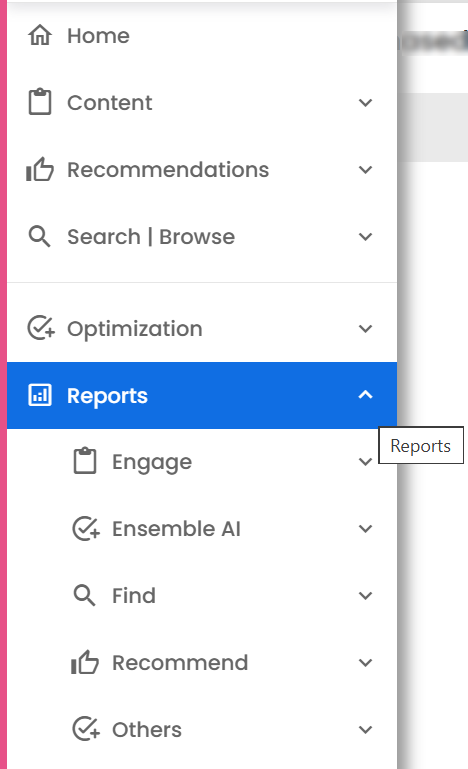
Reports Menu: Organized by Module and Replenishment Report Enabled
The Reports menu has been reorganized to improve navigation and usability. Reports are now grouped by module, and within each module, reports are sorted alphabetically.
The Replenishment Report has been enabled in the Reports menu. Modules now include Find, Recommend, Engage, Social Proof, Ensemble AI, and Others. Each module displays its relevant reports, while site-level reports such as Order Details Report, Real-time Analytics, Co-occurrence Report, Replenishment Report, Scorecard Report, Session Level Report, and Benchmark Report remain available for all sites.
Jira: ENG-32215
Strategy Rules: Search Term Context Support
A new Search Term option has been added to the Context definition in Strategy Rules. This allows users to trigger specific strategies based on the current search term, enabling more targeted product recommendations.
Users can enter one or more free-form search terms using OR logic. The Search Term tab does not include a “Use for Find” option. When saved, the defined search terms are displayed in the Where column on the Strategy Rules list page. When editing a rule that includes search terms, the Search Term tab is automatically activated.
Jira: ENG-32346
Ensemble AI
Expanded Seed Product Selection Window
The Ensemble AI interface has been enhanced to improve seed product selection. The selection window has been extended vertically to display up to four seed products instead of two.
This update applies when viewing ensembles for individual styles as well as across styles, providing improved visibility and usability during seed selection.
Jira: ENG-32236
Sales Assistant Chatbot
Product Attributes Configuration for Product Q&A
The LLM Configuration page has been enhanced to support product attributes for Product Q&A. A new section, ‘Product Attributes to Answer Product Questions’, has been added after the filter section.
Users can now configure one or more product attributes that the chatbot can use when answering product-related questions. Attribute selection supports auto-complete, consistent with the existing filter attribute behavior.
Jira: ENG-32307
Sales Assistant Chatbot User Interface: Image Input Enabled
The Sales Assistant Chatbot user interface now supports image uploads, allowing shoppers to attach a product photo along with, or instead of, text for AI-powered recommendations.
An image picker appears when enableImageUpload is enabled and accepts image files up to 4 MB, with automatic compression if needed. A thumbnail preview is shown before and after sending. Image-only messages are supported when imageOnlyQuery is enabled. Image messages use POST /post, while text-only messages continue via GET. The upload button is disabled during processing and when product selection is active. Chat history displays both image and text.
Jira: ENG-32485
Other Feature Enhancements
The following feature enhancements and upgrades have been made in the release version 26.11.
|
Jira # |
Module/Title |
Summary |
General Availability |
|---|---|---|---|
|
Enterprise Dashboard: Placement Profile Page - Edit Strategy Messages |
The Placement Profile page has been enhanced to allow users to edit strategy messages directly from the Strategies tab. A pencil edit icon is now available in the expanded view of the strategies table. For strategies with translations, the edit icon appears next to the translation count. Clicking the edit icon opens a simplified Strategy Message widget in a right-side panel. Users can update the Global Strategy Message and its translations. Messages saved from this page apply only to the page type of the placement being viewed, unlike the Configurable Strategies page, where messages can be saved across multiple page types. |
01-Jun-26 |
|
|
Enterprise Dashboard: Navigation and URL Improvements |
Navigation behavior has been improved across Configurable Strategies, User Affinity Configuration, and the Placement Profile page to better align with user expectations. Direct links to detail pages now open the correct detail view instead of redirecting to the list page. Additionally, unnecessary characters have been removed from URLs to ensure cleaner and more consistent links. |
01-Jun-26 |
|
|
New Dynamic Experience UI: New Templates Added |
The New Dynamic Experience UI now includes several new templates to expand configuration options. These include templates for Ensemble AI, Custom HTML (empty), Category Recommendations, Product Bundle Placement, and Chatbot. These templates enable faster setup and deployment of common experience types within the Dynamic Experience workflow. |
01-Jun-26 |
|
|
Dynamic Experiences: showOnlyQualified Enabled by Default |
The client.js script has been updated to use the showOnlyQualified=true parameter by default in Experiences API calls. With the related issues resolved, this change ensures that only qualified experiences are returned by default, aligning with the intended Dynamic Experiences behavior. |
01-Jun-26 |
|
|
Configurable Strategies: URL Update |
The URL for the new Configurable Strategies page has been updated to /configurableStrategies.jsp to provide a cleaner and more intuitive path. In addition, the old Configurable Strategies page has been moved to a different URL to avoid conflicts. |
01-Jun-26 |
|
|
Recommend: Portal API: Bulk Save and Publish for Strategy Messages |
Enhancements have been made to improve efficiency when saving and publishing Strategy Messages from the Configurable Strategies page. A new option allows a specific strategy to be passed into the /strategies API, returning data only for that strategy across all page types, reducing load time. Strategy messages can now be saved and published across multiple page types in a single action. The Activity Log reflects the dashboard user who performed the update. |
01-Jun-26 |
|
|
Placement Profile Page: Improved Collapsed View on Strategies Tab |
The Strategies tab on the Placement Profile page has been enhanced to improve readability and reduce information overload. The collapsed view is now the default view. In the collapsed view, rules and fallback configurations are displayed in a simplified format. For each rule, the view shows the rule name, priority, production and integration enablement status, and a preview of the first three strategies, along with a count of additional strategies (for example, “+4 more”). Strategy messages are not displayed in the collapsed view. |
01-Jun-26 |
|
|
Sales Assistant Chatbot:
|
Performance reporting has been introduced to measure conversions, sales, and engagement driven by chat interactions. Purchases within a configurable look-back window are attributed to chat when a user clicks a product link from the chat and completes a purchase tied to the same user or session. Reports include both overall and chat-attributable metrics, rolled up by dimensions such as date, channel, region, and currency. Key metrics include Chat Sessions, Interactions, Clicks, Attributable Orders, Sales, Items, Revenue per Visit, Conversion Rate, Average Order Value, and Click Through Rate. |
01-Jun-26 |
|
|
Sales Assistant Chatbot: Color as a Configurable Hard Filter |
A new ‘Filter by Color’ option has been added to the LLM Configuration page, allowing color to be enforced as a hard filter in Sales Assistant Chatbot responses. When enabled, the API applies filtering using a standardized set of tagged colors to ensure consistent and accurate results, while still supporting natural color variations in user queries. |
01-Jun-26 |
|
|
Sales Assistant Chatbot: Gender Options Removed from LLM Configuration |
The Gender Options have been removed from the LLM Configuration page. Instead of manually specifying gender values, users now configure the relevant attribute, and the system automatically retrieves and applies the associated values. This simplifies configuration and reduces manual setup. |
01-Jun-26 |
|
|
Engage: External JDBC Session Support Enabled |
External JDBC session support has been enabled in Engage to allow session data to be stored in a centralized database. This ensures consistent session handling across requests and improves reliability in multi-instance environments. With this update, users who log in and navigate directly to specific Engage pages are now correctly redirected to the intended page after authentication, instead of being sent to the default landing page. |
01-Jun-26 |
|
|
Streaming Engine: item_store_index Updates and Cleanup |
The Streaming Engine has been enhanced to maintain the item_store_index table during replace and update events. These events now insert data into the table, while item delete events retain existing records as expected. In addition, snapshot purge operations now remove the corresponding data from the item_store_index table to ensure proper cleanup and data consistency. |
01-Jun-26 |
Bug and Support Fixes
The following issues have been fixed in the release version 26.11.
|
Jira # |
Module/Title |
Summary |
General Availability |
|---|---|---|---|
|
Guided Selling: Improvements to “Log Answers to UPS” |
Issues in the “Log answers to UPS” option of Guided Selling have been addressed to ensure cleaner and more consistent attribute logging. For answers with multiple selected values, unnecessary leading spaces have been removed and only the Display Text is now used as the attribute value. For answers with no selected values, the Display Text is now passed correctly instead of sending an empty attribute. |
01-Jun-26 |
|
|
Ensemble AI: LLM System Base Prompt Update |
The LLM system base prompt has been updated to ensure that ensemble generation returns exactly n items, including the seed products. This enhancement enforces consistent output sizing and ensures that the total number of generated parts aligns with the requested limit. |
01-Jun-26 |
|
|
Sales Assistant Chatbot: Image Upload Support
|
Shoppers can now upload a product photo along with, or instead of, a text message. The image is sent to the LLM as a multimodal input, enabling more contextual and accurate responses. An image picker button is available in the chat input area, supporting images up to 4 MB. A thumbnail preview is displayed before sending and appears in the user’s chat bubble after submission. Messages can be sent with an image only, without requiring any text input. |
01-Jun-26 |
|
|
Sales Assistant Chatbot: Search Response Prompt Update |
The Sales Assistant Chatbot prompt has been updated to remove the “Good News” phrasing from search responses. In addition, follow-up questions are now limited to a single, simple question to ensure clearer and more concise interactions. |
01-Jun-26 |
|
|
Rules API: 400 Bad Request When Saving with Rating and Reviews |
An issue was identified where the /api/rules endpoint returned a 400 Bad Request error when “Rating and Reviews” was added in the Context section and the rule was saved. The issue has been resolved, and rules including “Rating and Reviews” in the Context section can now be saved successfully without errors. |
01-Jun-26 |
|
|
Find API: Exception in Multi Token Plugin |
An issue was identified in the multi token plugin where certain queries caused a Solr syntax error. Specifically, queries ending with logical operators such as AND resulted in a parsing failure when querying the querytag collection. The issue has been resolved by improving query handling to prevent invalid tokens from being passed to Solr. Queries with trailing operators are now handled gracefully, and the multi token plugin processes them without errors. |
01-Jun-26 |
|
|
Recommend: Configurable Strategy and Rule Not Displaying |
An issue was reported where a newly created Configurable Strategy and associated Strategy Rule were live in production but not returning the expected results. The issue has been identified and resolved. The Configurable Strategy and Strategy Rule now return results as expected in production. |
01-Jun-26 |
|
|
Configurable Strategies UI: Product Attribute Persistence Fix |
An issue in the new Configurable Strategies user interface caused selected product attributes to disappear when switching between seed options in Product Attribute Based models. This has been resolved. The Product Attribute selector now displays correctly when applicable, supports a single whitelisted attribute as intended, enables required options by default, and retains all selections after saving and reopening the strategy. |
01-Jun-26 |
|
|
Engage: Engage Personalization Not Working |
An issue was reported where Engage personalization was not functioning across placements. Active campaigns were serving only the default content, regardless of targeting rules, user segments, or user affinity. The issue occurred for both logged-in and anonymous users and affected multiple placements site-wide. The issue has been identified and resolved. Engage placements now correctly evaluate targeting rules and user affinity, and personalized content is served as expected. |
01-Jun-26 |
|
|
Email Content: Variables Returning Null Values |
An issue was identified where layout variables in email content, such as description, label, and title, were returning null values instead of the expected content attribute values. The issue was reproducible across debug URLs, Content Test Drive, and client integration tests. The issue has been resolved. Email layouts now correctly return the configured content attribute values, and variables no longer display null when valid data exists. |
01-Jun-26 |
|
|
Content Catalog: Incorrect Enhanced Tag Display |
An issue was identified where tags in the Content Catalog page were displayed as underlined in blue, indicating they were enhanced, even when they were not configured as enhanced tags. The display behavior has been corrected. Tags are now highlighted appropriately based on their actual enhancement status. |
01-Jun-26 |
|
|
Configurable Strategies: DSW Multiproduct Table Errors |
An issue occurred when creating a DSW Configurable Strategy using a multiproduct table with “Use Multiple Items.” The modelParams field was missing in save and preview payloads, causing 500 errors and inconsistent preview behavior. The issue has been resolved. Save and preview now include the required fields, and all selected options persist correctly when reopening the strategy. |
01-Jun-26 |
|
|
Enterprise Dashboard: Benchmark Report Loading Issue |
The Benchmark report was not loading because it was still using rest-api-v1, while other reports had already been migrated to rest-api-v2. The report has now been updated to use rest-api-v2 and is loading correctly. |
01-Jun-26 |
|
|
Recommend: Advanced Merchandising Rule: Job Not Running |
The Advanced Merchandising job for site 205 was not running due to recent Data Science Workbench (DSW) changes. The issue has been resolved, and the Advanced Merchandising job is now running successfully. |
01-Jun-26 |