Release Summary 26.17 | Aug 20, 2026
The following key features and improvements, along with bug fixes, have been released in ADA Digital Experience Personalization (DXP) in the release version 26.17.
Ensemble AI
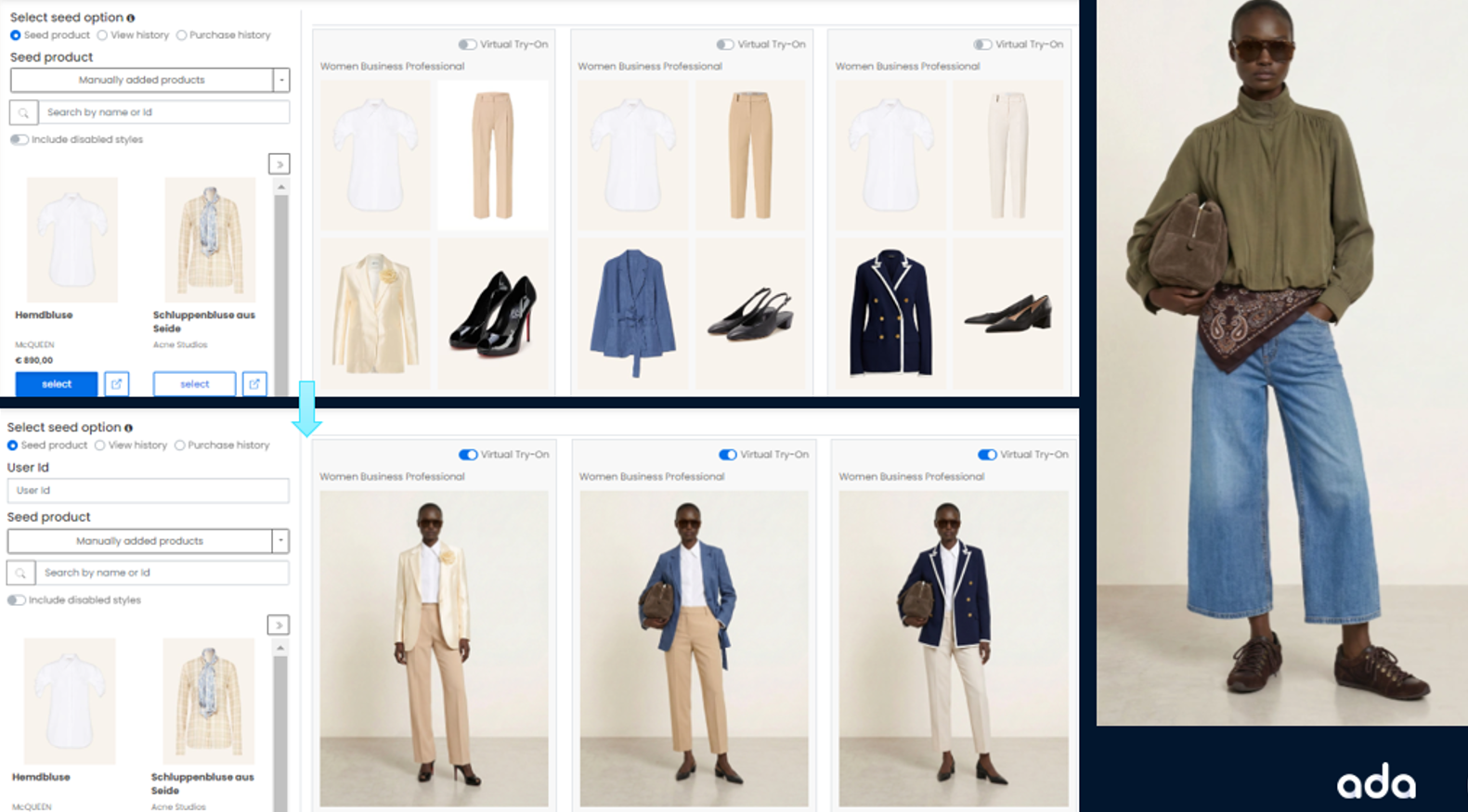
Virtual Try-On (VTO) Support in Ensemble AI
Virtual Try-On is now integrated into the Ensemble AI pipeline, allowing outfits generated by Ensemble AI to be rendered on a model image using AI-generated try-on visuals. This gives shoppers and merchandisers a realistic preview of how an outfit looks when worn, rather than only a flat-lay or grid view of individual items.
Key Capabilities:
Automatic VTO generation: After an ensemble is generated, a VTO job runs to produce a try-on image for that outfit. This happens without blocking ensemble delivery. If VTO generation fails or is still processing, the ensemble itself is still returned and available in the API and portal.
New API attribute: The Ensemble AI API now returns a VTO image URL at the style level for each outfit, along with an availability flag, so front-end and portal integrations can easily detect whether a VTO image exists for a given outfit.
Merchandiser review toggle: Merchandisers can toggle between the standard ensemble view and the Virtual Try-On view while reviewing outfits, both for a single outfit and across all outfits for a seed or style. This is available wherever outfit review happens, including at the style level and across styles.
Site-level control: VTO visibility in the merchandiser portal is controlled by a site-level setting. If VTO is not enabled for a site, the toggle option does not appear in review screens.
Graceful fallback: If an individual outfit does not have a VTO image available, its toggle is shown disabled rather than hidden, so merchandisers can clearly see that VTO is not available for that specific outfit while still being able to review others that do.
AI-generated models: Outfits default to AI-generated models wearing the outfit for diverse and inclusive visualizations when no custom model is provided.
Improved Product Link Experience in Ensemble AI
Ensemble AI now offers an improved way to view product information directly from the interface. The product details link has been redesigned and repositioned below the product image next to the Select option, and this access has been extended to products within ensembles, not just seed products.
Clicking an ensemble now opens a popup listing all products within it, along with details such as name, product ID, brand, and price, plus links to the product catalog and website.
Jira: ENG-32645
Social Proof
Flexible Message Configuration for Social Proof
Social Proof now supports flexible message configuration based on event type, messaging mode, and interval, removing the previous limit of nine fixed combinations. Users can create configurations by selecting an event type such as views, add to cart, purchases, or inventory, choosing a messaging mode, including interval based, recency based, personalized, or inventory based, and defining threshold ranges with text for each language, all processed seamlessly by the underlying messaging API.
Configurations appear in a list view showing priority, event type, mode, and thresholds, and can be edited or deleted if manually added, while default messages can be hidden but not deleted, giving greater flexibility to tailor messaging to specific events and time windows.
Simplified Integration Options for Social Proof
Social Proof now offers a simplified way to configure integration with other experiences such as Shopping Assistant and Ensemble AI, replacing technical language with clearer options. A new "Integrate with other experiences" toggle is available under display settings, off by default, letting users choose whether messaging appears on the web page and other experiences, or only on other experiences.
Users can also enter a subscription ID so that only experiences sharing the same ID receive the messaging, making it possible to configure different messaging for experiences like Chat and Ensemble AI without overlap.
Jira: ENG-32900
Enhanced Social Proof Message Level Reporting
Social Proof message level reporting now includes a new Type column indicating whether messaging appeared on item pages or on list and cart pages, along with List Page Clicks and List Page CTR metrics specific to list and category pages. Bar graph visualizations are available for clicks and CTR, making it easier to compare message level performance at a glance.
This gives merchandisers a clearer picture of how messaging performs across page types, helping them understand which messages are driving clicks and optimize messaging strategy based on actual engagement.
Recency Based Messaging for Social Proof
Social Proof now supports recency based messaging through both the SP Messaging API and the UI, allowing messages such as "Purchased X min ago" to be shown when an event, view, purchase, or add to cart, occurred within a defined threshold, rather than through fixed intervals. Default thresholds are 10 minutes for views, 15 minutes for add to cart, and 30 minutes for purchases, all configurable with custom ranges.
Message text can be customized using parameters like @lastPurchase, @lastView, and @lastAtc, and these variants can be prioritized alongside existing message types and shown or hidden individually, with support across all languages.
Jira: ENG-32788, ENG-31268, ENG-32882
Product Attributes as Variables in Social Proof Messaging
Social Proof messaging now supports inserting product attributes, such as category and brand, directly into message text as dynamic variables, so messages reflect the specific product a shopper is viewing, for example "Top Seller in @Category category." Category values follow a defined priority: a category parameter in the request is used first, then the product's primary category as stored, or a random category if none is set, and messages are not shown if a selected attribute is missing.
Jira: ENG-32300
Shopping Assistant
Shopper Feedback Now Captured in Shopping Assistant Transcript Report
Shopper feedback from the shopping assistant is now persisted into HDFS as part of the Shopping Assistant Transcript report, in addition to being published in real time to the existing streaming topic. Each feedback record is associated with its corresponding session and conversation ID, allowing it to be joined with transcript data for reporting and analysis.
This makes it possible to correlate shopper feedback with session and conversation level insights directly within the Shopping Assistant Transcript report, giving merchandising and analytics teams a more complete view of shopping assistant performance without impacting existing transcript reporting.
Jira: ENG-33072
Brand Filtering Support for Chatbot
The LLM Configuration for chat now includes a "Filter by Brand" option, allowing responses to be filtered to a specific brand when a shopper asks about one, using the LLM to interpret the query rather than a predefined brand list. To support this, brand information is now included as a separate metadata column in the Zilliz collection rather than embedded within the text content, enabling more accurate, brand-specific results.
This gives eCommerce managers more precise control over chatbot responses. Field length inference during catalog loading has also been improved by scanning all relevant files, preventing truncation errors for fields whose length varies across files.
Recommend
Co-occurrence Report Now Uses Primary Categories
The Co-occurrence Report now considers only primary categories when generating rollups, improving the reliability of the rollup process. Primary categories can be defined either through a primary category attribute configuration or by specifying primary category nodes at the high level category structure.
This gives sites a more consistent and dependable co-occurrence report, provided their primary categories are properly configured.
Jira: ENG-32633
Enterprise Dashboard
Streamlined Dynamic Experiences UI
The Dynamic Experiences interface has been redesigned to align with the Social Proof and Guided Selling interfaces, significantly reducing the steps needed to create and edit experiences.
What has changed:
Faster path to editing: Previously, editing a variation's template involved a 3-step experience wizard (General, Targeting, Variations), followed by a second 3-step wizard inside the variation editor (General, Template, Design), before reaching the actual code and preview. Now, opening an existing variation goes directly to the editor, making it easier to complete creative and development work.
Reordered creation flow: Creating a new experience previously required defining targeting and triggering before a template could be selected. Now, users name the experience, pick a template, and begin editing immediately, with targeting and triggering set later when ready to preview or go live.
Full-page editor: The variation editor no longer uses a modal overlay. It now uses the full window, providing more room to work with template code and preview side by side.
Custom templates carried over: All existing templates have been migrated to the new interface. Users can continue to create and use their own templates through "My Templates," alongside the standard Engage Templates library.
Cleaner experience list: The experiences list now filters out expired experiences by default, making it easier to find active experiences. The "View expired only" option at the top of the list surfaces expired experiences when needed.
Increased Combination Support in MVT Multi-dimensional Filtering
MVT multi-dimensional filtering now supports significantly more than the previous limit of 10 combinations, allowing merchandisers to work with a larger set of category, page type, and other dimension combinations without repeatedly reselecting them. Combinations are now displayed directly in the report, fully expanded and ordered alphabetically, with paging to keep the report easy to navigate.
Jira: ENG-29016
MVT trend graphs now show Add to Cart and ATC Rate only when these metrics are part of the underlying report table, rather than appearing for all test types regardless of relevance. This keeps trend graphs consistent with the metrics actually available in each report, reducing confusion when reviewing test performance.
Jira: ENG-33009
Other Feature Enhancements
The following feature enhancements and upgrades have been made in the release version 26.17.
|
Jira # |
Module/Title |
Summary |
General Availability |
|---|---|---|---|
|
Reduced Latency for Chatbot Product Recommendations |
Latency in the chatbot's product recommendation tool has been reduced by improving how the underlying data collection loads and by consolidating multiple concurrent API calls into a single batched call. Vector queries sharing the same filter are now also batched into a single call rather than run across multiple parallel threads, further improving response times. |
20-Aug-26 |
|
|
Recommend: Job-Level Map-Reduce Configuration Support |
Map-reduce configurations can now be set at the individual job level rather than only globally, allowing specific jobs to use custom settings without affecting other sites running the same job type. If a job does not have job-level configs defined, the default configuration continues to apply. |
20-Aug-26 |
|
|
Shopping Assistant Chatbot: Improved Hard Filter Accuracy for Chat |
Filter attribute names and values, such as gender or age group, are now made available to the runtime chat service so they can be passed to the LLM along with the shopper's question. This ensures the correct value is used when querying the catalog, so filtering by a hard filter attribute now reliably returns only products matching that value. |
20-Aug-26 |
|
|
Recommend: Improved Compatibility for Publisher Service |
The Publisher Service container now uses the rr_base docker image instead of AlmaLinux, resolving a startup incompatibility with the underlying host operating system. This ensures the Publisher Service starts reliably across supported environments. |
20-Aug-26 |
|
|
Social Proof: Configurable Optimization Settings for Social Proof |
Contextual optimization for Social Proof, along with its contextual parameters such as price, category, channel, customer segments, and day of the week, is now configurable through site settings. Clients can enable or disable contextual optimization using a master toggle and choose which parameters should be used for optimization. |
20-Aug-26 |
Bug and Support Fixes
The following issues have been fixed in the release version 26.17.
|
Jira # |
Module/Title |
Summary |
General Availability |
|---|---|---|---|
|
Recommend: Site-Level Access Control Fix for Manual Merchandising Rules |
We have fixed an issue where manual merchandising rules could be viewed or accessed from a site other than the one they were created for, bypassing the site-level permission checks already applied to other rule types. Manual merchandising rules now follow the same site-scoping logic as Rec Restriction, Rec Boosting, Strategy, and Advanced Merchandising rules, so access is correctly restricted to the site a rule belongs to. |
20-Aug-26 |
|
|
Discover: Start Parameter Fix for Browse API |
We have fixed an issue in the Browse API where the start parameter was not being applied when processing results, causing the same set of results to be returned regardless of the start value provided. The start parameter is now correctly processed, so pagination through browse results behaves as expected. |
20-Aug-26 |
|
|
Social Proof: Social Proof Metrics Accuracy Fix |
We have fixed an issue where Social Proof metrics returned inconsistent values, resulting in overcounting, when the lastEventTime parameter was included in Metrics API and Messaging API calls. Metrics are now calculated consistently regardless of whether this parameter is passed. |
20-Aug-26 |