Preview an MVT Treatment
Overview
Before activating an MVT test, it is recommended that you preview each treatment to verify how it appears on your site. Previewing a treatment allows you to validate the configuration and ensure that the expected experience is displayed before the test goes live for customers.
Preview MVT Treatment from the Platform
To preview a treatment using MVT:
-
On the ADA Personalization Platform, go to Optimization > MVT.
-
Locate the previously created test on the Multivariate Tests page.
-
Under the Last manual treatment column, click Control.
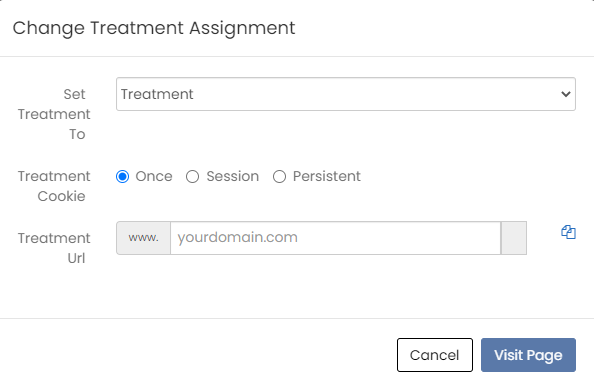
The Change Treatment Assignment window is displayed.
-
Select the treatment that you want to preview.
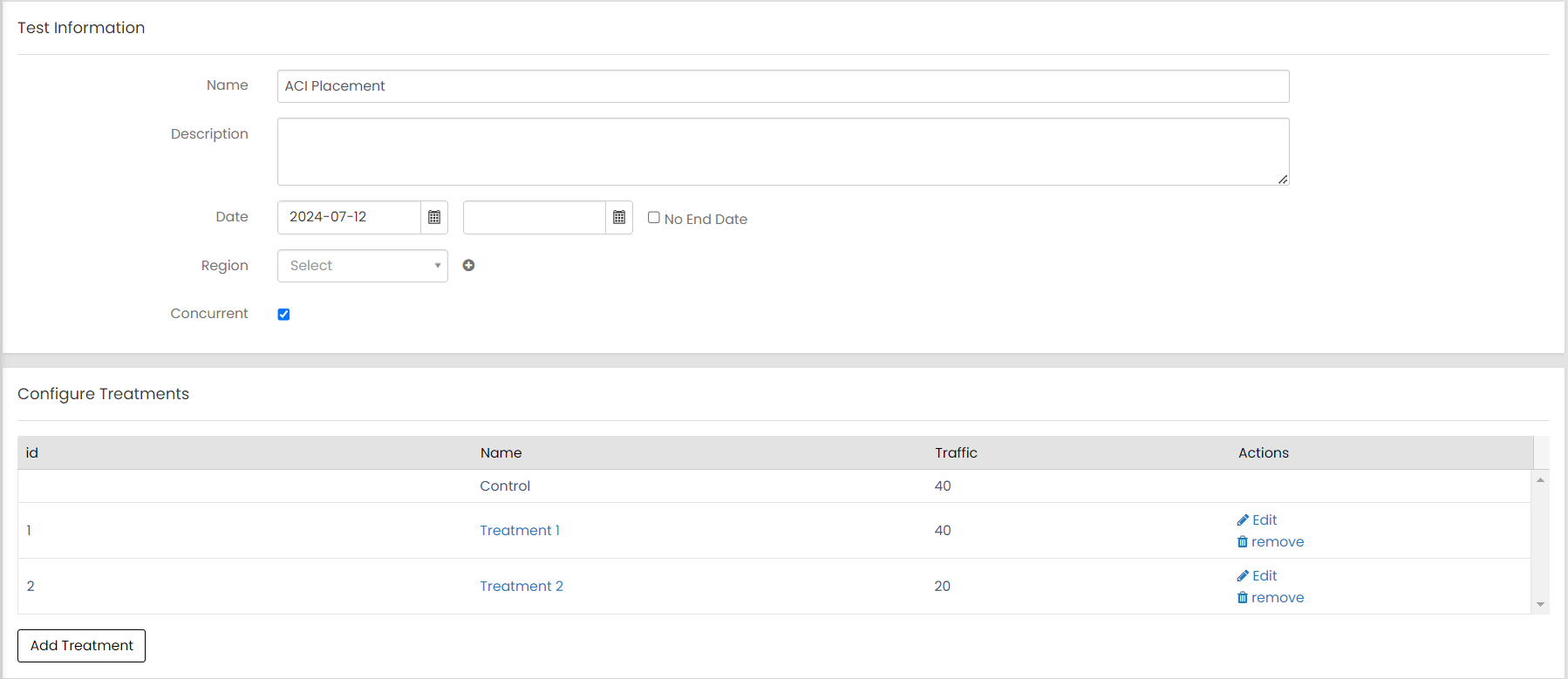
The treatment IDs can be found in the Configure Treatments table on the test page. These IDs are used in the URL to preview the test.
-
Specify how long the Treatment Cookie should persist - Once, Session, or Persistent.
-
Enter your domain information in Treatment Url field.
-
Click Visit Page.
-
To verify that a treatment appears as expected, append the parameter and treatment ID to the website URL.
Example:
Copyhttps://www.mystore.com/product?id=12345&r3_mvtTreatmentId=2909
The specified treatment is then applied when the page loads.
Use MVT with Third-Party A/B Testing Tools
You can use ADA MVT reporting and analytics while assigning traffic through a third-party experimentation platform.
In this setup, the external A/B testing tool controls which users receive each variation. The assigned treatment is then passed to ADA APIs using the mvt_ftr parameter so that the experience displayed to the shopper matches the treatment recorded in MVT reporting.
For client-side integrations, the treatment can be forced by using either of the following methods:
-
The r3_mvtTreatmentId query parameter in the page URL
-
The R3_COMMON.setMVTForcedTreatment() method
When a treatment is forced, the value is stored in R3_COMMON.mvtforcedTreatment and automatically passed to supported APIs as the mvt_ftr parameter.
The client.js library automatically appends the mvt_ftr parameter to API requests when a treatment is forced. This ensures that the treatment selected through URL parameters or JavaScript methods is consistently applied across supported API calls, such as Social Proof and Ensemble AI APIs.
Note: You can force a treatment no more than 7 days before the test is supposed to activate and no more than 14 days later than the test's expiration date.
Preview or Force a Treatment in Client-Side Integrations
Client-side integrations allow you to preview or force a treatment by using either a URL parameter or a JavaScript method.
Preview a Treatment Using a URL Parameter
You can preview a treatment by adding a query string parameter to your website URL. This method allows users without portal access to preview the treatment experience.
Use the following parameter:
r3_mvtTreatmentId=treatment IDAppend the parameter and treatment ID to your website URL.
Example
http://www.mystore.com/product?id=12345&r3_mvtTreatmentId=2909When the parameter is present in the URL, the specified treatment is applied and the treatment ID is passed to the underlying API calls as the mvt_ftr parameter.
Force a Treatment Using JavaScript
You can also force an MVT treatment using the R3_COMMON object.
Use the following method:
R3_COMMON.setMVTForcedTreatment("treatment ID");After the treatment is set:
-
The treatment ID is stored in R3_COMMON.mvtforcedTreatment.
-
The value is automatically included as the mvt_ftr parameter in supported API calls, such as Social Proof APIs and Ensemble AI APIs. The API uses the specified treatment instead of assigning one randomly.
This ensures that the treatment selected by the external testing tool is consistently applied and recorded in ADA reporting.
This approach allows external testing platforms to manage traffic assignment, while ADA continues to provide experiment reporting and analytics through MVT.
Force an MVT Treatment in Server-Side Integrations
For server-side integrations, treatment preview cannot be controlled using URL parameters. Instead, pass the treatment ID using the mvt_ftr parameter in the recsForPlacements API call to force the treatment.
mvt_ftr=treatment IDExample
recsForPlacement?placement=home_page&mvt_ftr=2909